

@mem0/openclaw-mem0 plugin. Your agent forgets everything between sessions. This plugin fixes that by automatically watching conversations, extracting what matters, and bringing it back when relevant.
Current package version:
1.1.0.Overview
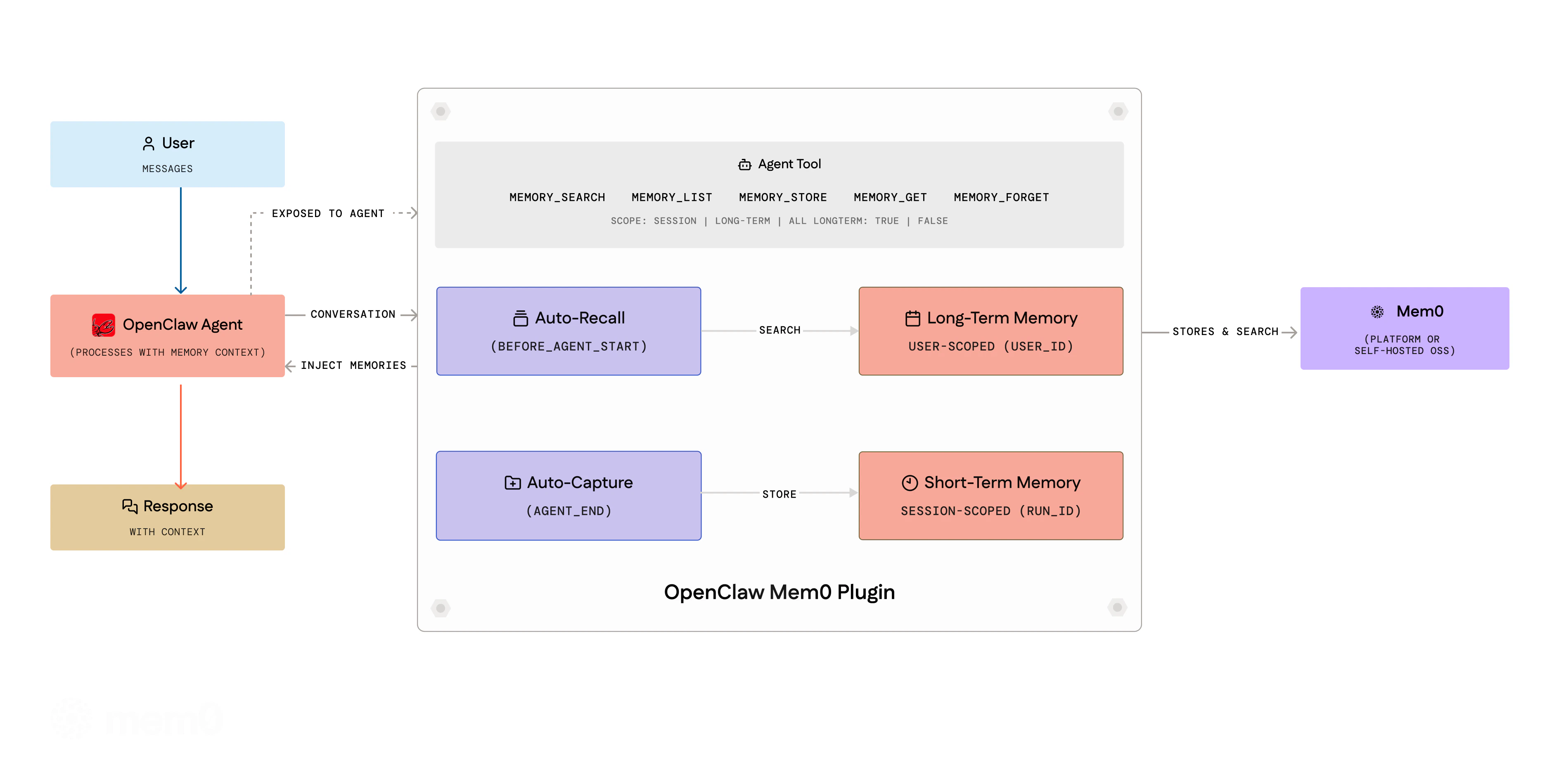
- Triage: The agent extracts durable facts from conversations using a structured protocol with importance gates and domain overlays
- Recall: Before each turn, relevant memories are retrieved with reranking and injected into context
- Agent Tools: Eight tools for explicit memory operations during conversations
autoRecall, and autoCapture are all enabled by default during openclaw mem0 init.
Automatic capture preserves the full text of selected user and assistant messages after noise filtering and secret redaction, without a per-message character cutoff. It selects recent messages and earlier work summaries; it does not capture every message in the conversation.
Requirements
Check your OpenClaw version:Installation
The fastest way is to install directly from your OpenClaw chat, no CLI or config editing needed. Copy and paste this into your OpenClaw chat; Telegram, WhatsApp, default chat, or any channel where your agent lives:Setup and Configuration
Understanding userId
The userId field is a string you choose to uniquely identify the user whose memories are being stored. It is not something you look up in the Mem0 dashboard: you define it yourself.
Pick any stable, unique identifier for the user. Common choices:
- Your application’s internal user ID (e.g.
"user_123","[email protected]") - A UUID (e.g.
"550e8400-e29b-41d4-a716-446655440000") - A simple username (e.g.
"alice")
userId: different values create separate memory namespaces. If you don’t set it, it defaults to your OS username.
Platform Mode (Mem0 Cloud)
There are two ways to set up@mem0/openclaw-mem0 on the Mem0 platform:
- Chat setup (recommended): run the setup inside any OpenClaw chat. No config editing, no API key handling.
- Manual config: edit
openclaw.jsondirectly.
Option 1: Chat Setup (Recommended)
You no longer need manual config editing to get started. Everything happens inside the OpenClaw chat itself.1
Send the setup command to your OpenClaw agent
Open any OpenClaw channel: Telegram, WhatsApp, your default chat, wherever your agent lives. Paste and send this command:OpenClaw responds with a Mem0 setup card and immediately asks:
“What’s your email address? I’ll send you a verification code to connect your Mem0 account.”
2
Enter your email
Type your email address and send it. Mem0 sends back:
“Check your email for a 6-digit code and paste it here.”
3
Paste the OTP
Copy the 6-digit code from your email inbox and paste it into the chat.You’ll see the confirmation:
“Connected to Mem0.”
The chat flow uses the same underlying config as manual setup: it writes
apiKey, userId, and skills config into openclaw.json for you. You can still open the file to inspect or override values afterward.Option 2: Manual Config
1
Install the plugin via the OpenClaw CLI
2
Get your API key
Get your API key from app.mem0.ai.
3
Select the plugin as your memory backend in openclaw.json
Add the full config to your
openclaw.json:Open-Source Mode (Self-hosted)
No Mem0 key is needed. Defaults use OpenAI (gpt-5-mini for LLM, text-embedding-3-small for embeddings), so OPENAI_API_KEY is required. For a fully local setup, use Ollama for both.
Option 1: Interactive Wizard (Recommended)
Run the guided 4-step wizard:1
LLM provider
Choose OpenAI (
gpt-5-mini), Ollama (llama3.1:8b, fully local), or Anthropic (claude-sonnet-4-5-20250514). Provide an API key or base URL as needed.2
Embedding provider
Choose OpenAI (
text-embedding-3-small) or Ollama (nomic-embed-text, local). If the same provider was chosen for LLM, the API key and URL are reused automatically.3
Vector store
Choose Qdrant (
http://localhost:6333) or PGVector (PostgreSQL). Connectivity is verified before proceeding.4
User ID
Set your memory namespace identifier.
Option 2: Non-Interactive Setup
For CI/CD, scripts, or agent-driven setup: pass all options as flags:--json for machine-readable output (useful when an LLM agent is driving the setup).
All --oss-* flags
All --oss-* flags
Option 3: Manual Config
Minimal config: uses OpenAI defaults:oss fields are optional. See Mem0 OSS docs for available providers.
Short-term vs Long-term Memory
Memories are organized into two scopes:-
Session (short-term): Auto-capture stores memories scoped to the current session via Mem0’s
run_id/runIdparameter. These are contextual to the ongoing conversation. -
User (long-term): The agent can explicitly store long-term memories using the
memory_addtool (withlongTerm: true, the default). These persist across all sessions for the user.
Agent Tools
The agent gets eight tools it can call during conversations:
The
memory_search and memory_list tools accept a scope parameter ("session", "long-term", or "all") to control which memories are queried.
CLI Commands
All commands support--json for machine-readable output. Use it when an LLM agent drives the CLI programmatically. Run openclaw mem0 help --json to discover every command and flag.
Configuration Options
General Options
Platform Mode Options
Open-Source Mode Options
Everything inside
oss is optional: defaults use OpenAI embeddings (text-embedding-3-small), in-memory vector store, and OpenAI LLM (gpt-5-mini).
Plugin Management
Updating the Plugin
Checking Plugin Status
Troubleshooting
”plugins.allow excludes mem0” Error
If you see an error like:mem0 to your plugins.allow list in openclaw.json:
Plugin Not Activating
If the plugin installs but doesn’t work:- Verify
plugins.slots.memoryis set to"openclaw-mem0"(not the npm package name) - Check
openclaw plugins list --enabledto confirm the plugin is loaded - Run
openclaw mem0 statusto verify configuration
Plugin Update Not Working
Ifopenclaw plugins update fails:
- Use the plugin ID:
openclaw plugins update openclaw-mem0 - Update all plugins at once:
openclaw plugins update --all - If that fails, uninstall and reinstall:
Privacy & Security
Data Flow
Auto-Capture and Auto-Recall
Auto-capture and auto-recall are enabled by default. They also run when skills mode is configured (the default afteropenclaw mem0 init). Set autoRecall or autoCapture to false to disable the corresponding automatic hook while using skills.
To disable either:
memory_add, memory_search, etc.) explicitly regardless of these settings.
Credential Protection
The plugin never stores API keys, tokens, or secrets as memories. Four independent layers enforce this:- Triage gate: The extraction prompt rejects values matching known credential patterns (
sk-,m0-,ghp_,AKIA,Bearer,password=,token=,secret=) - Extraction instructions: Default extraction rules explicitly instruct the model to store only that a credential was configured, never the value
- Configurable patterns: Add custom credential patterns via
skills.triage.credentialPatterns - CLI redaction:
openclaw mem0 config showredacts sensitive fields (apiKey,oss.*.config.apiKey)
API Key Storage
Plugin config is stored in~/.openclaw/openclaw.json with file permissions 0o600 (owner-read-only). For production deployments, use environment variable references (${MEM0_API_KEY}) or SecretRef objects instead of plaintext keys.
Telemetry
Usage telemetry (PostHog) is enabled by default to help improve the plugin. No conversation content or memory values are included, only event counts (recall, capture, tool usage, CLI commands). These events are not anonymous. OpenClaw does not send your account email the way the SDK does, but it does send an unsalted SHA-256 hash of it, falling back to a hash of the API key and then to a random per-machine id. Mem0 holds the email the hash is derived from, so the hash identifies your account rather than concealing it. The first run that resolves an account also emits a PostHog$identify, which permanently merges any earlier random id into that identity.
To opt out, set the environment variable:
System Prompt Context
The plugin injects memory-related instructions into the agent’s system context via OpenClaw’sprependSystemContext mechanism. This includes the memory triage protocol and recalled memories. This is the standard OpenClaw plugin SDK pattern for memory backends. No user-facing prompts are modified.

OpenAI Agents SDK
Build agents with OpenAI’s SDK and Mem0
LangGraph Integration
Create stateful agent workflows with memory
Using Mem0? Star us on GitHub to help more developers discover memory for AI apps.