

add, then call search before the next model request to fetch relevant context. Your app decides which returned memories to include in the prompt.
Use Mem0 when you want agents to remember useful facts across turns, sessions, or users without replaying the full transcript every time.
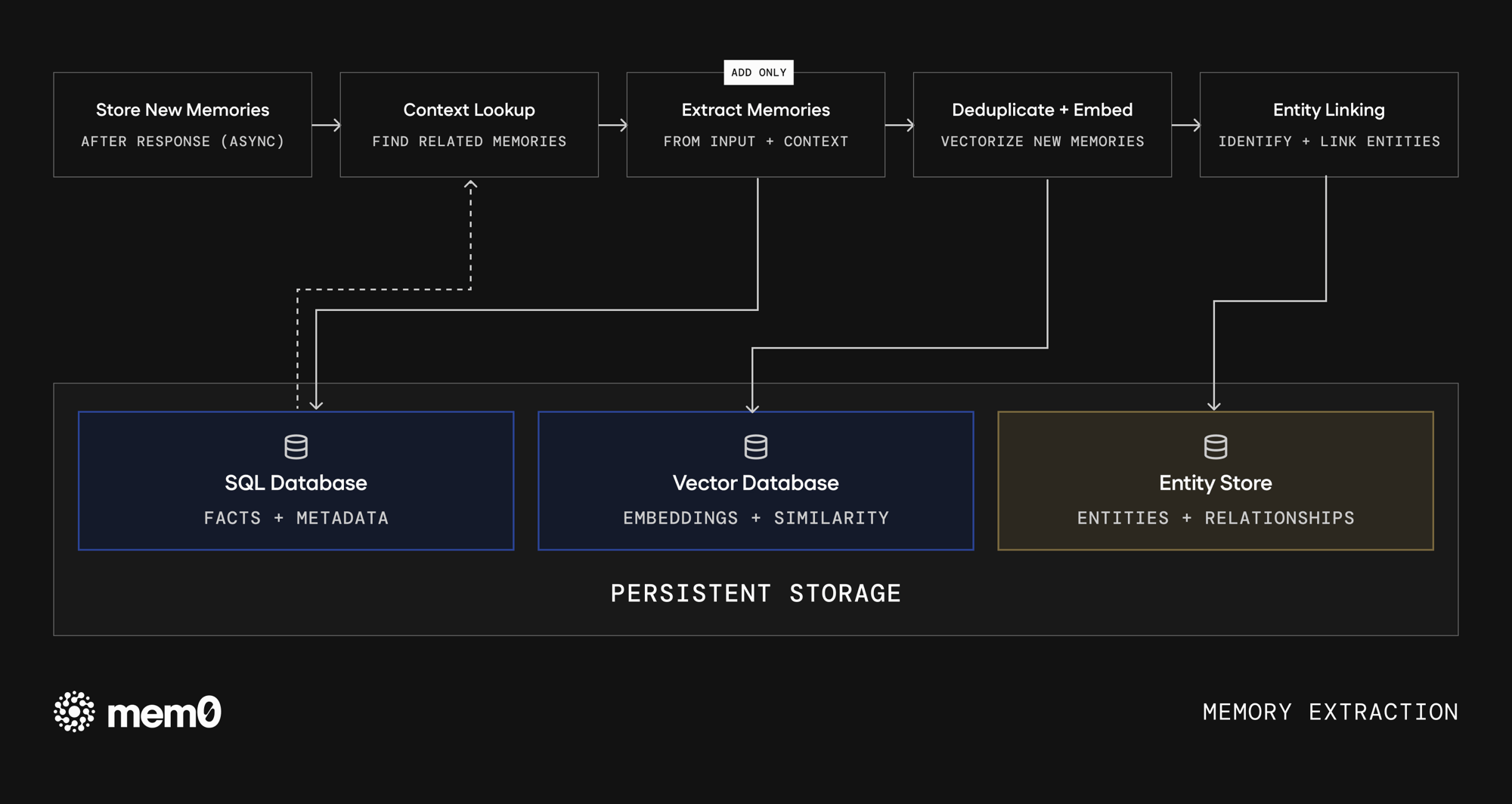
Memory extraction: Mem0 turns messages into stored facts with metadata, embeddings, and optional entity relationships.
The mental model
Messages vs memories
You send Mem0 messages. By default, Mem0 stores extracted memories, not a verbatim transcript.
Use
infer=False when you need to store raw content exactly as provided. Otherwise, keep inference enabled so retrieval works on clean, deduplicated facts.
Two phases: extraction and retrieval
Most applications use Mem0 in two places:- After a useful interaction, call
addto store what should be remembered. - Before a model call, call
searchand pass the best results into your prompt.
1. Extraction (writing memory)
When new messages arrive, Mem0 extracts durable facts and stores them with the identifiers and metadata you provide.- Context lookup. Mem0 checks related existing memories so it can avoid storing the same fact again.
- Fact extraction. An LLM extracts preferences, decisions, plans, and other details your agent can reuse.
- Deduplication and embedding. Redundant facts are removed, then each memory is embedded for semantic search.
- Entity extraction. Mem0 pulls out the people, places, organizations, and concepts each memory mentions and stores them for entity matching at search time. On Platform these entities also become the nodes of Graph Memory.
update or delete operations when your application needs to correct or remove a memory.
2. Retrieval (reading memory)
When you callsearch, Mem0 ranks stored memories against your query and filters.
Platform retrieval fuses these signals in the managed service, where the entity signal is powered by built-in Graph Memory. OSS retrieval depends on your configured vector store and optional reranker, and boosts on entity overlap alone: it has no graph memory.
Always scope searches with filters such as
user_id, agent_id, or run_id. This keeps memories from different users, agents, or sessions from mixing.Where memories live
Mem0 stores different parts of a memory in stores built for different lookup patterns:
On Mem0 Platform, these stores are managed for you. In OSS, you choose and operate the backing stores through your configuration.
Build against this flow
- Call
addonly for information worth reusing later: preferences, decisions, account facts, goals, and durable feedback. - Call
searchbefore the model response, then include only the returned memories that help answer the current request. - Use metadata for filters your product already cares about, such as workspace, feature area, tenant, or data source.
- Avoid storing secrets, raw credentials, or unredacted sensitive data. Mem0 is designed to retrieve stored context.
Next steps
Entity scoping
Organize Platform memories by user, agent, app, and run.
Memory operations
Add, search, update, and delete memories from your app.
See the benchmarks
Review the evaluation setup and benchmark results.