> ## Documentation Index
> Fetch the complete documentation index at: https://docs.mem0.ai/llms.txt
> Use this file to discover all available pages before exploring further.
# OpenClaw
> Add long-term memory to OpenClaw agents using the Mem0 plugin with skills-based memory extraction and recall.
Add long-term memory to [OpenClaw](https://github.com/openclaw/openclaw) agents with the `@mem0/openclaw-mem0` plugin. Your agent forgets everything between sessions. This plugin fixes that by automatically watching conversations, extracting what matters, and bringing it back when relevant.
## Overview
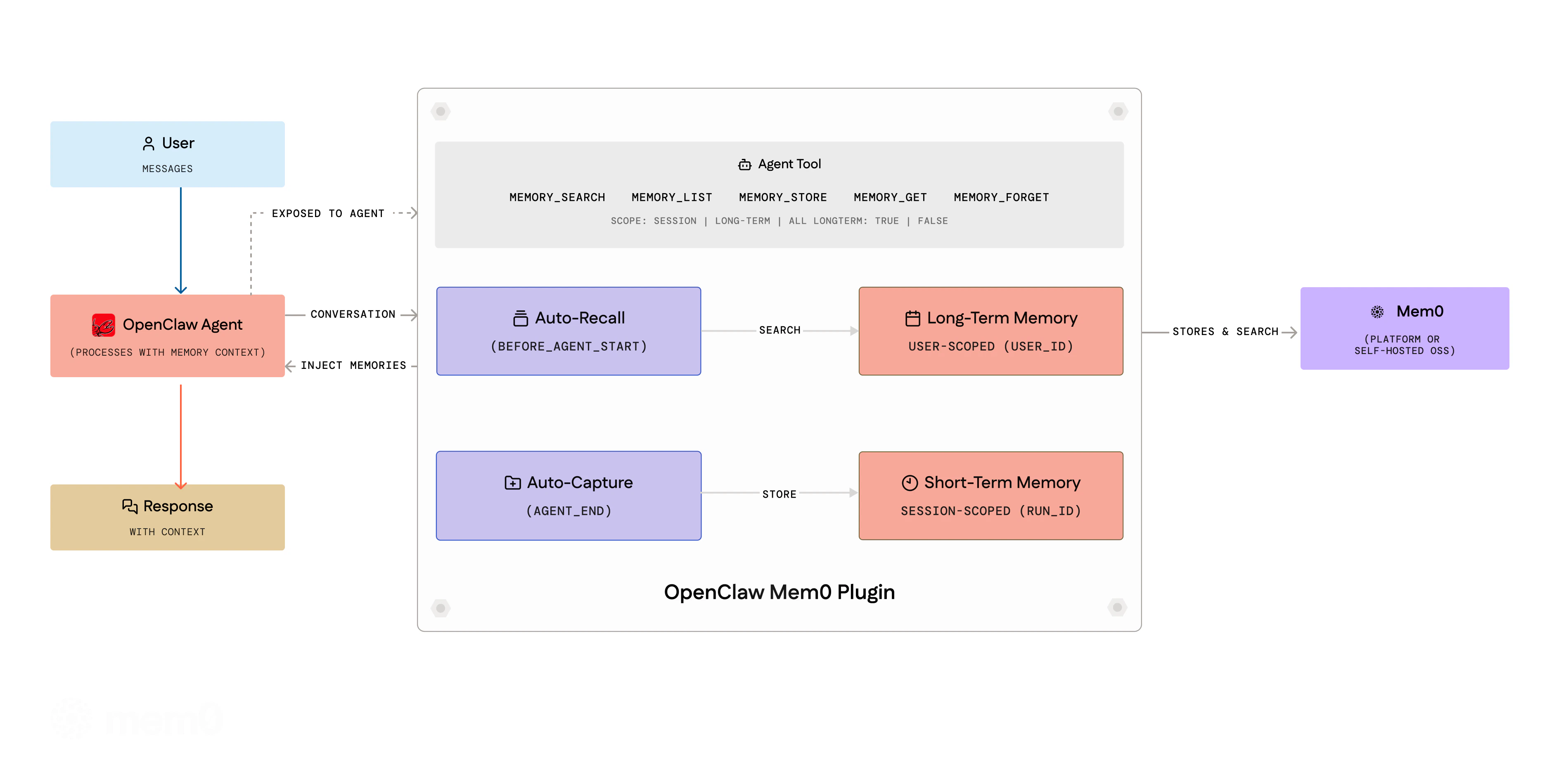 The plugin provides:
1. **Triage**: The agent extracts durable facts from conversations using a structured protocol with importance gates and domain overlays
2. **Recall**: Before each turn, relevant memories are retrieved with reranking and injected into context
3. **Dream**: Periodic memory consolidation merges duplicates, resolves conflicts, prunes stale entries
4. **Agent Tools**: Eight tools for explicit memory operations during conversations
Skills mode, `autoRecall`, and `autoCapture` are all enabled by default during `openclaw mem0 init`.
## Requirements
Check your OpenClaw version:
```bash theme={null}
openclaw --version
# OpenClaw 2026.4.25 (aa36ee6)
```
| OpenClaw Version | Plugin Support |
| ---------------- | --------------- |
| `>= 2026.4.25` | Fully supported |
## Installation
The fastest way is to install directly from your OpenClaw chat, no CLI or config editing needed.
**Copy and paste this into your OpenClaw chat**; Telegram, WhatsApp, default chat, or any channel where your agent lives:
```
Setup Mem0 from mem0.ai/claw-setup
```
OpenClaw installs the plugin, prompts you for your email, and connects your Mem0 account with OTP verification. See [Chat Setup](#option-1-chat-setup-recommended) below for the full walkthrough.
If you prefer the OpenClaw CLI, or are setting up self-hosted / open-source mode, see [Manual Config](#option-2-manual-config) and [Open-Source Mode](#open-source-mode-self-hosted) below.
## Setup and Configuration
### Understanding `userId`
The `userId` field is a **string you choose** to uniquely identify the user whose memories are being stored. It is **not** something you look up in the Mem0 dashboard: you define it yourself.
Pick any stable, unique identifier for the user. Common choices:
* Your application's internal user ID (e.g. `"user_123"`, `"alice@example.com"`)
* A UUID (e.g. `"550e8400-e29b-41d4-a716-446655440000"`)
* A simple username (e.g. `"alice"`)
All memories are scoped to this `userId`: different values create separate memory namespaces. If you don't set it, it defaults to your OS username.
In a multi-user application, set `userId` dynamically per user (e.g. from your auth system) rather than hardcoding a single value.
### Platform Mode (Mem0 Cloud)
There are two ways to set up `@mem0/openclaw-mem0` on the Mem0 platform:
* **Chat setup (recommended)**: run the setup inside any OpenClaw chat. No config editing, no API key handling.
* **Manual config**: edit `openclaw.json` directly.
#### Option 1: Chat Setup (Recommended)
You no longer need manual config editing to get started. Everything happens inside the OpenClaw chat itself.
Open any OpenClaw channel: Telegram, WhatsApp, your default chat, wherever your agent lives. Paste and send this command:
```
Setup Mem0 from mem0.ai/claw-setup
```
OpenClaw responds with a Mem0 setup card and immediately asks:
> "What's your email address? I'll send you a verification code to connect your Mem0 account."
Type your email address and send it. Mem0 sends back:
> "Check your email for a 6-digit code and paste it here."
Copy the 6-digit code from your email inbox and paste it into the chat.
You'll see the confirmation:
> "Connected to Mem0."
That's it. No API key, no config file editing, no environment variables. The plugin is now active with skills-based memory (triage, recall, and dream) running automatically.
The chat flow uses the same underlying config as manual setup: it writes `apiKey`, `userId`, and `skills` config into `openclaw.json` for you. You can still open the file to inspect or override values afterward.
#### Option 2: Manual Config
```bash theme={null}
openclaw plugins install @mem0/openclaw-mem0
```
Get your API key from app.mem0.ai.
Add the full config to your `openclaw.json`:
```json5 theme={null}
{
"plugins": {
"slots": {
"memory": "openclaw-mem0"
},
"entries": {
"openclaw-mem0": {
"enabled": true,
"config": {
"apiKey": "${MEM0_API_KEY}",
"userId": "alice", // any unique identifier you choose for this user
"skills": {
"triage": { "enabled": true },
"recall": {
"enabled": true,
"tokenBudget": 1500,
"rerank": true,
"keywordSearch": true,
"identityAlwaysInclude": true
},
"dream": { "enabled": true },
"domain": "companion"
}
}
}
}
}
}
```
OpenClaw treats memory plugins as an exclusive slot. Installing the plugin alone does **not** activate it: you must also set `plugins.slots.memory` as shown above.
### Open-Source Mode (Self-hosted)
No Mem0 key is needed. Defaults use OpenAI (`gpt-5-mini` for LLM, `text-embedding-3-small` for embeddings), so `OPENAI_API_KEY` is required. For a fully local setup, use Ollama for both.
#### Option 1: Interactive Wizard (Recommended)
Run the guided 4-step wizard:
```bash theme={null}
openclaw mem0 init --mode open-source
```
The wizard walks you through:
Choose OpenAI (`gpt-5-mini`), Ollama (`llama3.1:8b`, fully local), or Anthropic (`claude-sonnet-4-5-20250514`). Provide an API key or base URL as needed.
Choose OpenAI (`text-embedding-3-small`) or Ollama (`nomic-embed-text`, local). If the same provider was chosen for LLM, the API key and URL are reused automatically.
Choose Qdrant (`http://localhost:6333`) or PGVector (PostgreSQL). Connectivity is verified before proceeding.
Set your memory namespace identifier.
#### Option 2: Non-Interactive Setup
For CI/CD, scripts, or agent-driven setup: pass all options as flags:
```bash theme={null}
# Fully local with Ollama + Qdrant
openclaw mem0 init --mode open-source \
--oss-llm ollama --oss-embedder ollama --oss-vector qdrant
# OpenAI + Qdrant
openclaw mem0 init --mode open-source \
--oss-llm openai --oss-llm-key \
--oss-embedder openai --oss-embedder-key \
--oss-vector qdrant
# Anthropic LLM + OpenAI embeddings + PGVector
openclaw mem0 init --mode open-source \
--oss-llm anthropic --oss-llm-key \
--oss-embedder openai --oss-embedder-key \
--oss-vector pgvector --oss-vector-user postgres --oss-vector-password secret
```
Add `--json` for machine-readable output (useful when an LLM agent is driving the setup).
| Flag | Description |
| ------------------------------ | ---------------------------------------------------- |
| `--oss-llm ` | `openai`, `ollama`, or `anthropic` |
| `--oss-llm-key ` | API key for LLM provider |
| `--oss-llm-model ` | Override default LLM model |
| `--oss-llm-url ` | Base URL (Ollama only) |
| `--oss-embedder ` | `openai` or `ollama` |
| `--oss-embedder-key ` | API key for embedder |
| `--oss-embedder-model ` | Override default embedder model |
| `--oss-embedder-url ` | Base URL (Ollama only) |
| `--oss-vector ` | `qdrant` or `pgvector` |
| `--oss-vector-url ` | Qdrant server URL (default: `http://localhost:6333`) |
| `--oss-vector-host ` | PGVector host |
| `--oss-vector-port ` | PGVector port |
| `--oss-vector-user ` | PGVector user |
| `--oss-vector-password ` | PGVector password |
| `--oss-vector-dbname ` | PGVector database name |
| `--oss-vector-dims ` | Override embedding dimensions |
#### Option 3: Manual Config
Minimal config: uses OpenAI defaults:
```json5 theme={null}
{
"plugins": {
"slots": {
"memory": "openclaw-mem0"
},
"entries": {
"openclaw-mem0": {
"enabled": true,
"config": {
"mode": "open-source",
"userId": "alice" // any unique identifier you choose for this user
}
}
}
}
}
```
To customize providers:
```json5 theme={null}
{
"plugins": {
"slots": {
"memory": "openclaw-mem0"
},
"entries": {
"openclaw-mem0": {
"enabled": true,
"config": {
"mode": "open-source",
"userId": "your-user-id",
"oss": {
"embedder": { "provider": "openai", "config": { "model": "text-embedding-3-small" } },
"vectorStore": { "provider": "qdrant", "config": { "url": "http://localhost:6333" } },
"llm": { "provider": "openai", "config": { "model": "gpt-5-mini" } }
}
}
}
}
}
}
```
All `oss` fields are optional. See [Mem0 OSS docs](/open-source/node-quickstart) for available providers.
## Short-term vs Long-term Memory
Memories are organized into two scopes:
* **Session (short-term)**: Auto-capture stores memories scoped to the current session via Mem0's `run_id` / `runId` parameter. These are contextual to the ongoing conversation.
* **User (long-term)**: The agent can explicitly store long-term memories using the `memory_add` tool (with `longTerm: true`, the default). These persist across all sessions for the user.
During **auto-recall**, the plugin searches both scopes and presents them separately, with long-term memories first and session memories second. This means the agent has full context.
## Agent Tools
The agent gets eight tools it can call during conversations:
| Tool | Description |
| --------------------- | ------------------------------------------------------------------------------------- |
| `memory_search` | Search memories by natural language query. Supports `scope`, `categories`, `filters`. |
| `memory_add` | Store facts. Accepts `text` or `facts` array, `category`, `importance`, `metadata`. |
| `memory_get` | Retrieve a single memory by ID |
| `memory_list` | List all memories. Filter by `userId`, `agentId`, `scope`. |
| `memory_update` | Update a memory's text in place. Preserves history. |
| `memory_delete` | Delete by `memoryId`, `query` (search-and-delete), or `all: true`. |
| `memory_event_list` | List recent background processing events (platform mode only). |
| `memory_event_status` | Get status of a specific event by ID (platform mode only). |
The `memory_search` and `memory_list` tools accept a `scope` parameter (`"session"`, `"long-term"`, or `"all"`) to control which memories are queried.
## CLI Commands
All commands support `--json` for machine-readable output. Use it when an LLM agent drives the CLI programmatically. Run `openclaw mem0 help --json` to discover every command and flag.
```bash theme={null}
# Search all memories (long-term + session)
openclaw mem0 search "what languages does the user know"
# Search only long-term memories
openclaw mem0 search "what languages does the user know" --scope long-term
# Search only session/short-term memories
openclaw mem0 search "what languages does the user know" --scope session
# List all memories
openclaw mem0 list
openclaw mem0 list --user-id alice --top-k 20
# JSON output (any command)
openclaw mem0 search "preferences" --json
openclaw mem0 status --json
```
## Configuration Options
### General Options
| Key | Type | Default | Description |
| ----------------- | ------------------------------- | ------------ | ---------------------------------------------------------------------- |
| `mode` | `"platform"` \| `"open-source"` | `"platform"` | Which backend to use |
| `userId` | `string` | OS username | Scope memories per user |
| `autoRecall` | `boolean` | `true` | Inject memories before each turn. Ignored when `skills` is configured. |
| `autoCapture` | `boolean` | `true` | Store facts after each turn. Ignored when `skills` is configured. |
| `topK` | `number` | `5` | Max memories per recall |
| `searchThreshold` | `number` | `0.3` | Min similarity (0–1) |
### Platform Mode Options
| Key | Type | Default | Description |
| -------------------- | -------- | --------------- | ------------------------------------------------------- |
| `apiKey` | `string` | N/A | **Required.** Mem0 API key (supports `${MEM0_API_KEY}`) |
| `customInstructions` | `string` | *(built-in)* | Extraction rules: what to store, how to format |
| `customCategories` | `object` | *(12 defaults)* | Category name → description map for tagging |
### Open-Source Mode Options
| Key | Type | Default | Description |
| -------------------------- | --------- | ------------ | -------------------------------------------------------------- |
| `customInstructions` | `string` | *(built-in)* | Extraction prompt for memory processing |
| `oss.embedder.provider` | `string` | `"openai"` | Embedding provider (`"openai"`, `"ollama"`, etc.) |
| `oss.embedder.config` | `object` | N/A | Provider config: `apiKey`, `model`, `baseURL` |
| `oss.vectorStore.provider` | `string` | `"memory"` | Vector store (`"memory"`, `"qdrant"`, `"chroma"`, etc.) |
| `oss.vectorStore.config` | `object` | N/A | Provider config: `host`, `port`, `collectionName`, `dimension` |
| `oss.llm.provider` | `string` | `"openai"` | LLM provider (`"openai"`, `"anthropic"`, `"ollama"`, etc.) |
| `oss.llm.config` | `object` | N/A | Provider config: `apiKey`, `model`, `baseURL`, `temperature` |
| `oss.historyDbPath` | `string` | N/A | SQLite path for memory edit history |
| `oss.disableHistory` | `boolean` | `false` | Disable memory edit history tracking |
Everything inside `oss` is optional: defaults use OpenAI embeddings (`text-embedding-3-small`), in-memory vector store, and OpenAI LLM (`gpt-5-mini`).
## Plugin Management
### Updating the Plugin
```bash theme={null}
openclaw plugins update openclaw-mem0
```
### Checking Plugin Status
```bash theme={null}
openclaw plugins list
openclaw plugins inspect openclaw-mem0
```
## Troubleshooting
### "plugins.allow excludes mem0" Error
If you see an error like:
```
[openclaw] Failed to start CLI: Error: The `openclaw mem0` command is unavailable
because `plugins.allow` excludes "mem0". Add "mem0" to `plugins.allow` if you want
that bundled plugin CLI surface.
```
Add `mem0` to your `plugins.allow` list in `openclaw.json`:
```json5 theme={null}
{
"plugins": {
"allow": ["mem0"],
"slots": {
"memory": "openclaw-mem0"
}
}
}
```
### Plugin Not Activating
If the plugin installs but doesn't work:
1. Verify `plugins.slots.memory` is set to `"openclaw-mem0"` (not the npm package name)
2. Check `openclaw plugins list --enabled` to confirm the plugin is loaded
3. Run `openclaw mem0 status` to verify configuration
### Plugin Update Not Working
If `openclaw plugins update` fails:
1. Use the plugin ID: `openclaw plugins update openclaw-mem0`
2. Update all plugins at once: `openclaw plugins update --all`
3. If that fails, uninstall and reinstall:
```bash theme={null}
openclaw plugins uninstall openclaw-mem0
openclaw plugins install @mem0/openclaw-mem0
```
## Privacy & Security
### Data Flow
| Mode | Where data goes | Storage |
| --------------- | ------------------------------------------------------------------------------------------- | ---------------------------------- |
| **Platform** | Conversations sent to `api.mem0.ai` for extraction and storage | Mem0 cloud |
| **Open-source** | Embeddings generated via configured provider (default: OpenAI API). Vectors stored locally. | `~/.mem0/vector_store.db` (SQLite) |
### Auto-Capture and Auto-Recall
Auto-capture and auto-recall are **enabled by default**. When skills mode is configured (the default after `openclaw mem0 init`), these are ignored in favor of the skills-based triage/recall/dream protocol.
To disable either:
```json5 theme={null}
{
"plugins": {
"entries": {
"openclaw-mem0": {
"config": {
"autoCapture": false, // disable automatic fact extraction
"autoRecall": false // disable automatic memory injection
}
}
}
}
}
```
The agent can always use memory tools (`memory_add`, `memory_search`, etc.) explicitly regardless of these settings.
### Credential Protection
The plugin never stores API keys, tokens, or secrets as memories. Five independent layers enforce this:
1. **Triage gate**: The extraction prompt rejects values matching known credential patterns (`sk-`, `m0-`, `ghp_`, `AKIA`, `Bearer`, `password=`, `token=`, `secret=`)
2. **Dream cleanup**: Periodic memory consolidation deletes any memories that slipped through containing credential patterns
3. **Extraction instructions**: Default extraction rules explicitly instruct the model to store only that a credential was configured, never the value
4. **Configurable patterns**: Add custom credential patterns via `skills.triage.credentialPatterns`
5. **CLI redaction**: `openclaw mem0 config show` redacts sensitive fields (`apiKey`, `oss.*.config.apiKey`)
### API Key Storage
Plugin config is stored in `~/.openclaw/openclaw.json` with file permissions `0o600` (owner-read-only). For production deployments, use environment variable references (`${MEM0_API_KEY}`) or SecretRef objects instead of plaintext keys.
### Telemetry
Anonymous usage telemetry (PostHog) is enabled by default to help improve the plugin. No conversation content or memory values are included, only event counts (recall, capture, tool usage, CLI commands).
To opt out, set the environment variable:
```bash theme={null}
export MEM0_TELEMETRY=false
```
### System Prompt Context
The plugin injects memory-related instructions into the agent's system context via OpenClaw's `prependSystemContext` mechanism. This includes the memory triage protocol and recalled memories. This is the standard OpenClaw plugin SDK pattern for memory backends. No user-facing prompts are modified.
Build agents with OpenAI's SDK and Mem0
Create stateful agent workflows with memory
The plugin provides:
1. **Triage**: The agent extracts durable facts from conversations using a structured protocol with importance gates and domain overlays
2. **Recall**: Before each turn, relevant memories are retrieved with reranking and injected into context
3. **Dream**: Periodic memory consolidation merges duplicates, resolves conflicts, prunes stale entries
4. **Agent Tools**: Eight tools for explicit memory operations during conversations
Skills mode, `autoRecall`, and `autoCapture` are all enabled by default during `openclaw mem0 init`.
## Requirements
Check your OpenClaw version:
```bash theme={null}
openclaw --version
# OpenClaw 2026.4.25 (aa36ee6)
```
| OpenClaw Version | Plugin Support |
| ---------------- | --------------- |
| `>= 2026.4.25` | Fully supported |
## Installation
The fastest way is to install directly from your OpenClaw chat, no CLI or config editing needed.
**Copy and paste this into your OpenClaw chat**; Telegram, WhatsApp, default chat, or any channel where your agent lives:
```
Setup Mem0 from mem0.ai/claw-setup
```
OpenClaw installs the plugin, prompts you for your email, and connects your Mem0 account with OTP verification. See [Chat Setup](#option-1-chat-setup-recommended) below for the full walkthrough.
If you prefer the OpenClaw CLI, or are setting up self-hosted / open-source mode, see [Manual Config](#option-2-manual-config) and [Open-Source Mode](#open-source-mode-self-hosted) below.
## Setup and Configuration
### Understanding `userId`
The `userId` field is a **string you choose** to uniquely identify the user whose memories are being stored. It is **not** something you look up in the Mem0 dashboard: you define it yourself.
Pick any stable, unique identifier for the user. Common choices:
* Your application's internal user ID (e.g. `"user_123"`, `"alice@example.com"`)
* A UUID (e.g. `"550e8400-e29b-41d4-a716-446655440000"`)
* A simple username (e.g. `"alice"`)
All memories are scoped to this `userId`: different values create separate memory namespaces. If you don't set it, it defaults to your OS username.
In a multi-user application, set `userId` dynamically per user (e.g. from your auth system) rather than hardcoding a single value.
### Platform Mode (Mem0 Cloud)
There are two ways to set up `@mem0/openclaw-mem0` on the Mem0 platform:
* **Chat setup (recommended)**: run the setup inside any OpenClaw chat. No config editing, no API key handling.
* **Manual config**: edit `openclaw.json` directly.
#### Option 1: Chat Setup (Recommended)
You no longer need manual config editing to get started. Everything happens inside the OpenClaw chat itself.
Open any OpenClaw channel: Telegram, WhatsApp, your default chat, wherever your agent lives. Paste and send this command:
```
Setup Mem0 from mem0.ai/claw-setup
```
OpenClaw responds with a Mem0 setup card and immediately asks:
> "What's your email address? I'll send you a verification code to connect your Mem0 account."
Type your email address and send it. Mem0 sends back:
> "Check your email for a 6-digit code and paste it here."
Copy the 6-digit code from your email inbox and paste it into the chat.
You'll see the confirmation:
> "Connected to Mem0."
That's it. No API key, no config file editing, no environment variables. The plugin is now active with skills-based memory (triage, recall, and dream) running automatically.
The chat flow uses the same underlying config as manual setup: it writes `apiKey`, `userId`, and `skills` config into `openclaw.json` for you. You can still open the file to inspect or override values afterward.
#### Option 2: Manual Config
```bash theme={null}
openclaw plugins install @mem0/openclaw-mem0
```
Get your API key from app.mem0.ai.
Add the full config to your `openclaw.json`:
```json5 theme={null}
{
"plugins": {
"slots": {
"memory": "openclaw-mem0"
},
"entries": {
"openclaw-mem0": {
"enabled": true,
"config": {
"apiKey": "${MEM0_API_KEY}",
"userId": "alice", // any unique identifier you choose for this user
"skills": {
"triage": { "enabled": true },
"recall": {
"enabled": true,
"tokenBudget": 1500,
"rerank": true,
"keywordSearch": true,
"identityAlwaysInclude": true
},
"dream": { "enabled": true },
"domain": "companion"
}
}
}
}
}
}
```
OpenClaw treats memory plugins as an exclusive slot. Installing the plugin alone does **not** activate it: you must also set `plugins.slots.memory` as shown above.
### Open-Source Mode (Self-hosted)
No Mem0 key is needed. Defaults use OpenAI (`gpt-5-mini` for LLM, `text-embedding-3-small` for embeddings), so `OPENAI_API_KEY` is required. For a fully local setup, use Ollama for both.
#### Option 1: Interactive Wizard (Recommended)
Run the guided 4-step wizard:
```bash theme={null}
openclaw mem0 init --mode open-source
```
The wizard walks you through:
Choose OpenAI (`gpt-5-mini`), Ollama (`llama3.1:8b`, fully local), or Anthropic (`claude-sonnet-4-5-20250514`). Provide an API key or base URL as needed.
Choose OpenAI (`text-embedding-3-small`) or Ollama (`nomic-embed-text`, local). If the same provider was chosen for LLM, the API key and URL are reused automatically.
Choose Qdrant (`http://localhost:6333`) or PGVector (PostgreSQL). Connectivity is verified before proceeding.
Set your memory namespace identifier.
#### Option 2: Non-Interactive Setup
For CI/CD, scripts, or agent-driven setup: pass all options as flags:
```bash theme={null}
# Fully local with Ollama + Qdrant
openclaw mem0 init --mode open-source \
--oss-llm ollama --oss-embedder ollama --oss-vector qdrant
# OpenAI + Qdrant
openclaw mem0 init --mode open-source \
--oss-llm openai --oss-llm-key \
--oss-embedder openai --oss-embedder-key \
--oss-vector qdrant
# Anthropic LLM + OpenAI embeddings + PGVector
openclaw mem0 init --mode open-source \
--oss-llm anthropic --oss-llm-key \
--oss-embedder openai --oss-embedder-key \
--oss-vector pgvector --oss-vector-user postgres --oss-vector-password secret
```
Add `--json` for machine-readable output (useful when an LLM agent is driving the setup).
| Flag | Description |
| ------------------------------ | ---------------------------------------------------- |
| `--oss-llm ` | `openai`, `ollama`, or `anthropic` |
| `--oss-llm-key ` | API key for LLM provider |
| `--oss-llm-model ` | Override default LLM model |
| `--oss-llm-url ` | Base URL (Ollama only) |
| `--oss-embedder ` | `openai` or `ollama` |
| `--oss-embedder-key ` | API key for embedder |
| `--oss-embedder-model ` | Override default embedder model |
| `--oss-embedder-url ` | Base URL (Ollama only) |
| `--oss-vector ` | `qdrant` or `pgvector` |
| `--oss-vector-url ` | Qdrant server URL (default: `http://localhost:6333`) |
| `--oss-vector-host ` | PGVector host |
| `--oss-vector-port ` | PGVector port |
| `--oss-vector-user ` | PGVector user |
| `--oss-vector-password ` | PGVector password |
| `--oss-vector-dbname ` | PGVector database name |
| `--oss-vector-dims ` | Override embedding dimensions |
#### Option 3: Manual Config
Minimal config: uses OpenAI defaults:
```json5 theme={null}
{
"plugins": {
"slots": {
"memory": "openclaw-mem0"
},
"entries": {
"openclaw-mem0": {
"enabled": true,
"config": {
"mode": "open-source",
"userId": "alice" // any unique identifier you choose for this user
}
}
}
}
}
```
To customize providers:
```json5 theme={null}
{
"plugins": {
"slots": {
"memory": "openclaw-mem0"
},
"entries": {
"openclaw-mem0": {
"enabled": true,
"config": {
"mode": "open-source",
"userId": "your-user-id",
"oss": {
"embedder": { "provider": "openai", "config": { "model": "text-embedding-3-small" } },
"vectorStore": { "provider": "qdrant", "config": { "url": "http://localhost:6333" } },
"llm": { "provider": "openai", "config": { "model": "gpt-5-mini" } }
}
}
}
}
}
}
```
All `oss` fields are optional. See [Mem0 OSS docs](/open-source/node-quickstart) for available providers.
## Short-term vs Long-term Memory
Memories are organized into two scopes:
* **Session (short-term)**: Auto-capture stores memories scoped to the current session via Mem0's `run_id` / `runId` parameter. These are contextual to the ongoing conversation.
* **User (long-term)**: The agent can explicitly store long-term memories using the `memory_add` tool (with `longTerm: true`, the default). These persist across all sessions for the user.
During **auto-recall**, the plugin searches both scopes and presents them separately, with long-term memories first and session memories second. This means the agent has full context.
## Agent Tools
The agent gets eight tools it can call during conversations:
| Tool | Description |
| --------------------- | ------------------------------------------------------------------------------------- |
| `memory_search` | Search memories by natural language query. Supports `scope`, `categories`, `filters`. |
| `memory_add` | Store facts. Accepts `text` or `facts` array, `category`, `importance`, `metadata`. |
| `memory_get` | Retrieve a single memory by ID |
| `memory_list` | List all memories. Filter by `userId`, `agentId`, `scope`. |
| `memory_update` | Update a memory's text in place. Preserves history. |
| `memory_delete` | Delete by `memoryId`, `query` (search-and-delete), or `all: true`. |
| `memory_event_list` | List recent background processing events (platform mode only). |
| `memory_event_status` | Get status of a specific event by ID (platform mode only). |
The `memory_search` and `memory_list` tools accept a `scope` parameter (`"session"`, `"long-term"`, or `"all"`) to control which memories are queried.
## CLI Commands
All commands support `--json` for machine-readable output. Use it when an LLM agent drives the CLI programmatically. Run `openclaw mem0 help --json` to discover every command and flag.
```bash theme={null}
# Search all memories (long-term + session)
openclaw mem0 search "what languages does the user know"
# Search only long-term memories
openclaw mem0 search "what languages does the user know" --scope long-term
# Search only session/short-term memories
openclaw mem0 search "what languages does the user know" --scope session
# List all memories
openclaw mem0 list
openclaw mem0 list --user-id alice --top-k 20
# JSON output (any command)
openclaw mem0 search "preferences" --json
openclaw mem0 status --json
```
## Configuration Options
### General Options
| Key | Type | Default | Description |
| ----------------- | ------------------------------- | ------------ | ---------------------------------------------------------------------- |
| `mode` | `"platform"` \| `"open-source"` | `"platform"` | Which backend to use |
| `userId` | `string` | OS username | Scope memories per user |
| `autoRecall` | `boolean` | `true` | Inject memories before each turn. Ignored when `skills` is configured. |
| `autoCapture` | `boolean` | `true` | Store facts after each turn. Ignored when `skills` is configured. |
| `topK` | `number` | `5` | Max memories per recall |
| `searchThreshold` | `number` | `0.3` | Min similarity (0–1) |
### Platform Mode Options
| Key | Type | Default | Description |
| -------------------- | -------- | --------------- | ------------------------------------------------------- |
| `apiKey` | `string` | N/A | **Required.** Mem0 API key (supports `${MEM0_API_KEY}`) |
| `customInstructions` | `string` | *(built-in)* | Extraction rules: what to store, how to format |
| `customCategories` | `object` | *(12 defaults)* | Category name → description map for tagging |
### Open-Source Mode Options
| Key | Type | Default | Description |
| -------------------------- | --------- | ------------ | -------------------------------------------------------------- |
| `customInstructions` | `string` | *(built-in)* | Extraction prompt for memory processing |
| `oss.embedder.provider` | `string` | `"openai"` | Embedding provider (`"openai"`, `"ollama"`, etc.) |
| `oss.embedder.config` | `object` | N/A | Provider config: `apiKey`, `model`, `baseURL` |
| `oss.vectorStore.provider` | `string` | `"memory"` | Vector store (`"memory"`, `"qdrant"`, `"chroma"`, etc.) |
| `oss.vectorStore.config` | `object` | N/A | Provider config: `host`, `port`, `collectionName`, `dimension` |
| `oss.llm.provider` | `string` | `"openai"` | LLM provider (`"openai"`, `"anthropic"`, `"ollama"`, etc.) |
| `oss.llm.config` | `object` | N/A | Provider config: `apiKey`, `model`, `baseURL`, `temperature` |
| `oss.historyDbPath` | `string` | N/A | SQLite path for memory edit history |
| `oss.disableHistory` | `boolean` | `false` | Disable memory edit history tracking |
Everything inside `oss` is optional: defaults use OpenAI embeddings (`text-embedding-3-small`), in-memory vector store, and OpenAI LLM (`gpt-5-mini`).
## Plugin Management
### Updating the Plugin
```bash theme={null}
openclaw plugins update openclaw-mem0
```
### Checking Plugin Status
```bash theme={null}
openclaw plugins list
openclaw plugins inspect openclaw-mem0
```
## Troubleshooting
### "plugins.allow excludes mem0" Error
If you see an error like:
```
[openclaw] Failed to start CLI: Error: The `openclaw mem0` command is unavailable
because `plugins.allow` excludes "mem0". Add "mem0" to `plugins.allow` if you want
that bundled plugin CLI surface.
```
Add `mem0` to your `plugins.allow` list in `openclaw.json`:
```json5 theme={null}
{
"plugins": {
"allow": ["mem0"],
"slots": {
"memory": "openclaw-mem0"
}
}
}
```
### Plugin Not Activating
If the plugin installs but doesn't work:
1. Verify `plugins.slots.memory` is set to `"openclaw-mem0"` (not the npm package name)
2. Check `openclaw plugins list --enabled` to confirm the plugin is loaded
3. Run `openclaw mem0 status` to verify configuration
### Plugin Update Not Working
If `openclaw plugins update` fails:
1. Use the plugin ID: `openclaw plugins update openclaw-mem0`
2. Update all plugins at once: `openclaw plugins update --all`
3. If that fails, uninstall and reinstall:
```bash theme={null}
openclaw plugins uninstall openclaw-mem0
openclaw plugins install @mem0/openclaw-mem0
```
## Privacy & Security
### Data Flow
| Mode | Where data goes | Storage |
| --------------- | ------------------------------------------------------------------------------------------- | ---------------------------------- |
| **Platform** | Conversations sent to `api.mem0.ai` for extraction and storage | Mem0 cloud |
| **Open-source** | Embeddings generated via configured provider (default: OpenAI API). Vectors stored locally. | `~/.mem0/vector_store.db` (SQLite) |
### Auto-Capture and Auto-Recall
Auto-capture and auto-recall are **enabled by default**. When skills mode is configured (the default after `openclaw mem0 init`), these are ignored in favor of the skills-based triage/recall/dream protocol.
To disable either:
```json5 theme={null}
{
"plugins": {
"entries": {
"openclaw-mem0": {
"config": {
"autoCapture": false, // disable automatic fact extraction
"autoRecall": false // disable automatic memory injection
}
}
}
}
}
```
The agent can always use memory tools (`memory_add`, `memory_search`, etc.) explicitly regardless of these settings.
### Credential Protection
The plugin never stores API keys, tokens, or secrets as memories. Five independent layers enforce this:
1. **Triage gate**: The extraction prompt rejects values matching known credential patterns (`sk-`, `m0-`, `ghp_`, `AKIA`, `Bearer`, `password=`, `token=`, `secret=`)
2. **Dream cleanup**: Periodic memory consolidation deletes any memories that slipped through containing credential patterns
3. **Extraction instructions**: Default extraction rules explicitly instruct the model to store only that a credential was configured, never the value
4. **Configurable patterns**: Add custom credential patterns via `skills.triage.credentialPatterns`
5. **CLI redaction**: `openclaw mem0 config show` redacts sensitive fields (`apiKey`, `oss.*.config.apiKey`)
### API Key Storage
Plugin config is stored in `~/.openclaw/openclaw.json` with file permissions `0o600` (owner-read-only). For production deployments, use environment variable references (`${MEM0_API_KEY}`) or SecretRef objects instead of plaintext keys.
### Telemetry
Anonymous usage telemetry (PostHog) is enabled by default to help improve the plugin. No conversation content or memory values are included, only event counts (recall, capture, tool usage, CLI commands).
To opt out, set the environment variable:
```bash theme={null}
export MEM0_TELEMETRY=false
```
### System Prompt Context
The plugin injects memory-related instructions into the agent's system context via OpenClaw's `prependSystemContext` mechanism. This includes the memory triage protocol and recalled memories. This is the standard OpenClaw plugin SDK pattern for memory backends. No user-facing prompts are modified.
Build agents with OpenAI's SDK and Mem0
Create stateful agent workflows with memory